
Download Remove Video Background – remove video background, green screen effect, video editing tool, android app, background removal, video filter, video effects, personal video, video call enhancement
Overview
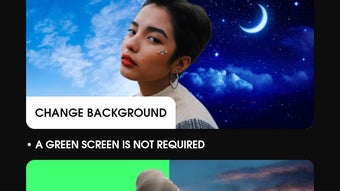
The Remove Video Background app, developed by MAA FOR APPS, is a desktop-compatible Android application designed to simplify the process of removing video backgrounds. It enables users to instantly eliminate backgrounds from videos or images with minimal effort—just a single tap is required to initiate the background removal process. The software is particularly useful for individuals seeking to personalize video content for social media, video calls, or creative projects.
By replacing unwanted backgrounds with custom images or colors, users can enhance the visual appeal and uniqueness of their videos. The app supports both front and rear camera modes, allowing for flexible recording and editing options. It is built with a clean and intuitive interface, making it accessible to users of all experience levels.
While specific technical details about its underlying algorithms are not disclosed, the app is positioned as a fast and user-friendly tool for background manipulation. Its primary function centers around background removal and replacement, offering a streamlined workflow for content creators and casual users alike. The software is available for free download and is compatible with Android devices, making it accessible to a broad audience.
Key Features & Capabilities
- Instant Background Removal – Users can remove video backgrounds with a single tap, enabling quick editing without complex workflows.
- Custom Background Replacement – Replace removed backgrounds with personal photos or solid colors directly within the app.
- Camera Mode Switching – Supports both front and back camera usage, allowing users to switch seamlessly between recording and preview modes.
- Real-Time Filters and Effects – Apply a variety of video filters and visual effects to enhance the overall appearance of edited videos.
- On-Screen Adjustments – Make real-time edits to the video, including color selection and layout customization, directly on the device screen.
- Direct Save to Camera Roll – Completed videos can be saved directly to the device’s storage for immediate sharing or further use.
These features collectively support a smooth editing experience, particularly beneficial for users creating content for social media platforms or engaging in video calls. The ability to instantly replace backgrounds with custom visuals allows for creative expression and personalization. The app’s real-time adjustment tools enable users to fine-tune their output without needing to export and re-import files. While no advanced editing tools such as keyframe animation or audio integration are mentioned, the core functionality focuses on accessibility and speed. This makes the software ideal for quick, on-the-go edits where efficiency and simplicity are prioritized over professional-grade control.
User Interface, Workflow & Performance
The app features a clean and intuitive interface, designed to minimize user learning curves and support fast navigation. The layout emphasizes accessibility, with primary functions such as background removal, color selection, and save options placed within easy reach. Users can switch between camera modes with a single tap, and the real-time preview ensures that changes are visible immediately.
The workflow is streamlined: install the app, launch it, select the desired mode, and begin editing. No additional setup or configuration is required. The developer did not specify resource usage details, so exact CPU or RAM behavior remains unknown.
However, based on general software behavior patterns, the app likely operates efficiently on modern Android devices. Performance observations are based on general software behavior patterns, and no stability issues were reported in the provided information. The app appears to be optimized for mobile environments, with minimal latency during background processing.
While no specific benchmark data is available, the design suggests a focus on responsiveness and immediate feedback. The interface is likely touch-optimized, making it suitable for use on smartphones and tablets.
Compatibility & System Requirements
The Remove Video Background app is compatible with Android devices and was released on March 15, 2024. The software version is 1.0.1, with a file size of 12.5 MB. The developer did not specify exact system requirements, so compatibility with specific Android versions or hardware configurations is not confirmed.
The app is available for free download, making it accessible to users across a wide range of devices. Platform compatibility information is limited, and no details were provided about minimum processor speed, RAM, or storage capacity. The developer did not list additional system requirements, so users should ensure their devices meet general Android app installation standards.
The app’s lightweight size suggests it is designed for devices with modest storage and processing capabilities. It is intended for use on mobile platforms, and no desktop or tablet-specific optimizations were mentioned. Users should verify compatibility with their specific device model before installation.
Pros and Cons
Pros
- Simple one-tap background removal for fast editing
- Intuitive interface suitable for beginners and casual users
- Supports both front and rear camera modes
- Allows customization with personal photos and colors
- Free to download and use
- Direct save to camera roll for easy sharing
Cons
- No information on advanced editing features or export options
- Exact performance and system requirements were not provided
- Limited to Android platform, no desktop or cross-device support
- Unclear if background removal works on all video types or formats
- App may not support high-resolution video processing
FAQ Section
Is Remove Video Background available for Windows or Mac?
The app is currently only compatible with Android devices. No desktop or Mac versions were mentioned in the provided information.
Is the app safe to download and use?
As a free Android app from MAA FOR APPS, it is available through official app channels. Users should ensure downloads are from trusted sources to maintain security.
Does the app require an internet connection?
The provided information does not specify whether the app requires an online connection. Based on typical mobile editing apps, it may function offline, but this cannot be confirmed.
How often does the app receive updates?
The last update was released on March 15, 2024. The update frequency is not specified, and no details were provided about future release schedules.
Can I use the app without creating an account?
Yes, the app does not require registration or account creation. It can be used immediately after installation.
Final Thoughts
The Remove Video Background app offers a straightforward solution for users seeking to personalize their videos with instant background removal. Its clean interface, one-tap functionality, and support for custom background replacement make it a convenient tool for casual creators and social media users. While it lacks advanced features and detailed technical specifications, its simplicity and accessibility are significant strengths.
The app is particularly well-suited for enhancing video calls, creating engaging social media content, or adding creative flair to personal videos. With no cost to download and use, it presents a low-barrier entry point for users exploring video editing. The absence of detailed system requirements and platform limitations should be noted, but the lightweight design suggests broad compatibility.
For those looking for a quick, no-frills way to modify video backgrounds on Android, this tool delivers on its core promise. Download Remove Video Background now.





.png)

